
Software & workflow
SVG, DXF or PDF? Choose by what the job must preserve
There is no universally best laser file format. Choose the handoff that carries the geometry, dimensions, text or pixels your job needs, then inspect the imported result before you assign operations or run the machine.
The direct answer
Use SVG when a vector-design handoff needs scalable shapes and your sending and receiving software agree on the artwork. Use DXF when CAD geometry is the main thing to exchange. Use PDF when the source arrives as a page that may combine vector, text and images. Use a raster image when pixels are the intended artwork.
The extension alone does not prove that scale, fonts, layers, closed paths or vector content survived. Import the file, check it against the source and confirm the machine job before processing material.
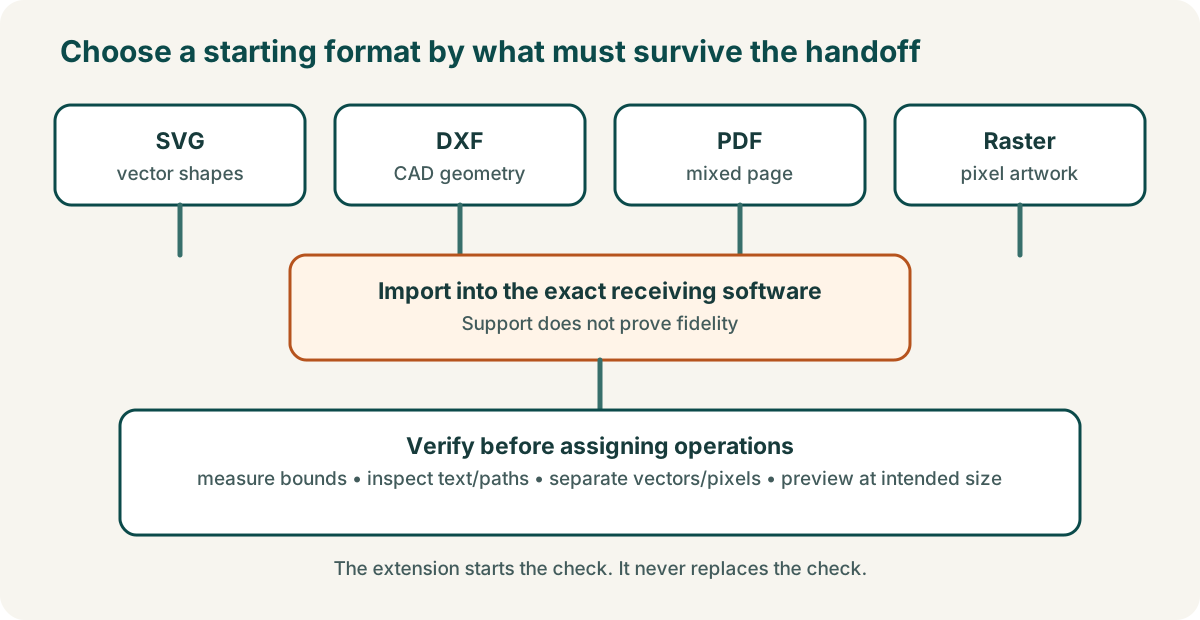
Choose by the information the job needs
| Job needs to preserve | Useful starting format | Check after import |
|---|---|---|
| Scalable vector shapes from design software | SVG | Overall dimensions, text treatment, fills/strokes, open and closed paths |
| CAD-style drawing geometry | DXF | Units, scale, curves/splines, duplicates and whether non-geometry data matters |
| A supplied page containing mixed content | Which elements arrived as vectors, text or pixels; page choice and scale | |
| Photograph or pixel artwork for image engraving | PNG or another supported raster format | Pixel dimensions, crop, transparency/background and intended physical size |
LightBurn’s current guide lists AI, SVG, DXF, PDF and plotter formats under vector/mixed imports, and lists common raster image formats separately.1 This confirms import support in that application; it does not guarantee that every feature from every authoring program will transfer unchanged.
What the names tell you—and what they do not
SVG is a vector-graphics standard, not a promise about your exact artwork
SVG is a W3C specification for scalable vector graphics.2 An SVG file can still contain text, styling and image content that another program interprets differently. Check the imported size and every operation-bearing shape.
DXF is an exchange family, not a universal unit guarantee
The Library of Congress describes DXF as Autodesk’s drawing interchange format family and records multiple versions and entity types.3 That is why the practical question is not merely “is this a DXF?” but “did the intended geometry and scale arrive correctly in this workflow?”
PDF is a document container, not automatically a clean cut file
PDF is a document/page-description format family that can carry different kinds of page content.4 A page that looks sharp on screen may include vectors, text, pixels or a mixture. Inspect what the laser software actually imported.
Run six checks before assigning the job
- Measure the imported bounds. Compare width and height with the source requirement.
- Inspect text. LightBurn says imported text needs the font installed or converted to paths; it does not import embedded fonts.1
- Check path integrity. Look for open paths, doubled lines, unexpected joins and missing curves.
- Separate vectors from pixels. Confirm which objects can receive line/fill operations and which are raster artwork.
- Map operations deliberately. Do not assume source colours or layers already mean cut, score or engrave.
- Preview at the intended physical size. Verify the job origin, bounds and operation order in the exact software/machine workflow.
A good file does not supply safe machine settings
Format choice does not establish power, speed, passes, focus, material suitability or machine capability. Those decisions depend on the exact machine, material and evidence. Treat downloaded or supplier files as geometry/artwork inputs, not permission to process an unknown material.
Sources
- LightBurn User Guide, “Creating and Importing Artwork”. Checked 3 October 2026. Used for its current import-format list and text/font limitation. Manufacturer/software documentation; no claim that imports are identical across authoring programs.↩
- W3C, Scalable Vector Graphics (SVG) 2. Used to identify SVG as the relevant W3C vector-graphics specification.↩
- Library of Congress, DXF family description. Used for DXF’s exchange-format family and version/entity context.↩
- Library of Congress, PDF family description. Used for PDF’s document/page-description format context.↩